Defined branded event space
Use the canopy and selected walls to create a recognizable campaign base within the planned event footprint.
Portable branded event system
Create a recognizable branded space for exhibitions, sports events, retail activations and promotional campaigns with a custom pop-up tent. Configure the size, printed canopy, wall panels and supporting event products around your project.
Compare the complete setup in Build Your Tent SetupSpecification-led quotation · No published price or unsupported performance claim
Direct answer
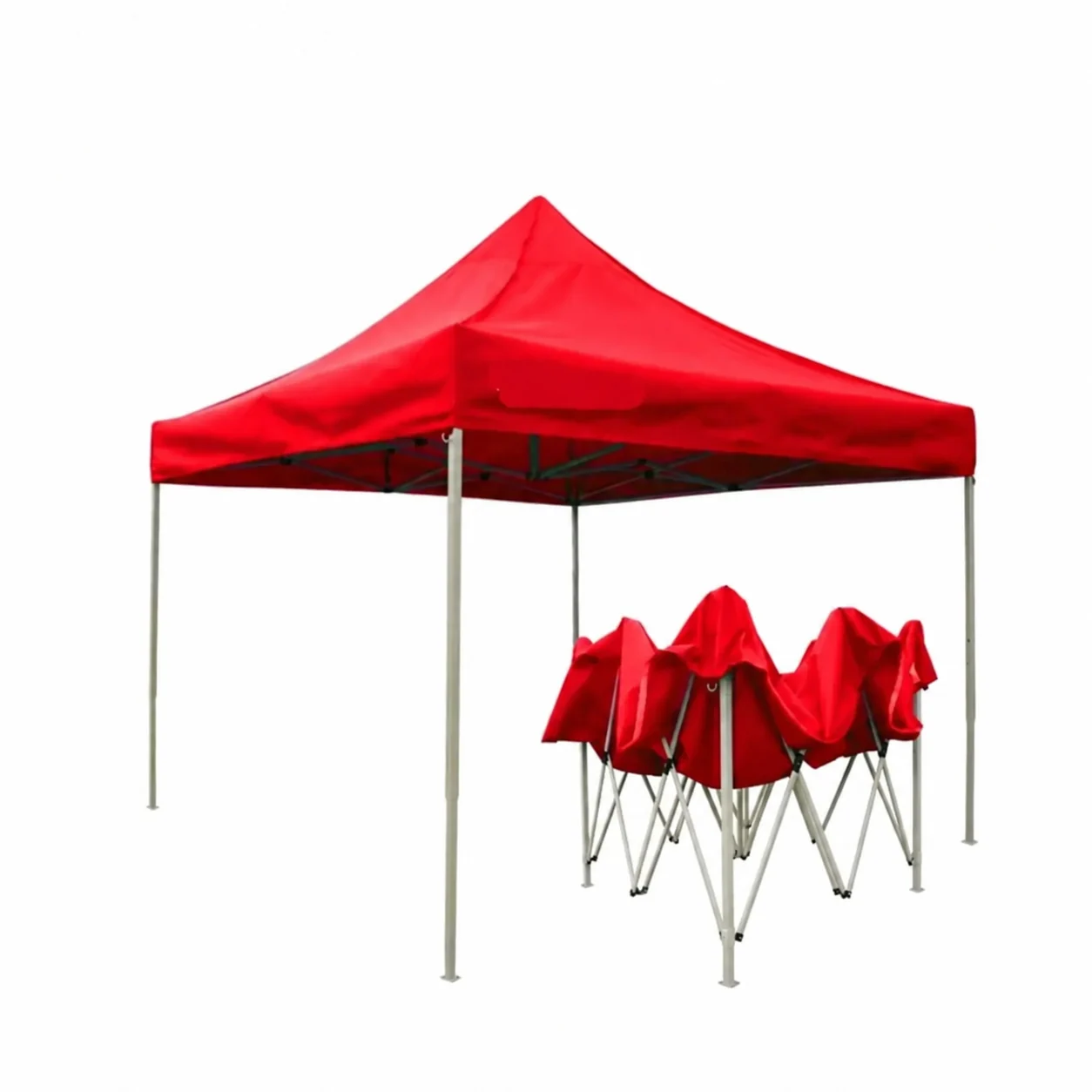
A custom pop-up tent is a portable event canopy format that combines a collapsible supporting frame with a branded canopy and optional printed wall configurations. Buyers can select the footprint, plan roof and valance graphics, choose walls around visitor access and display needs, and coordinate the tent with other event-branding products.
Format decision
A custom printed pop-up tent turns a portable canopy format into a defined branded environment. It can carry visible campaign graphics, adapt through different footprints and wall layouts, and coordinate with the other products used across an event.
Use the canopy and selected walls to create a recognizable campaign base within the planned event footprint.
Plan a branded event system that can support recurring campaigns when the confirmed graphics remain relevant.
Use roof and valance graphics to identify the brand from the priority visitor approach.
Add back, side or half-wall artwork around access, display and message requirements.
Choose 10×10, 10×15 or 10×20 according to available space and the functions planned beneath the canopy.
Connect the custom canopy tent with flags, table covers, counters, displays and promotional products.
Footprint navigator
Start with the portable pop-up format, then choose the footprint that supports the event activity, visitor access and surrounding display plan.
A focused starting point for one primary booth, registration, sampling or display function.
Explore this size 0210×15An intermediate footprint for a main activity plus additional presentation or conversation room.
Explore this size 0310×20A broader event base when several visitor-facing or team functions need clearer positions.
Explore this sizeQuick product configuration
Build the quotation brief around the format, event and graphic surfaces—not a published price. Each choice is reviewed as part of the final project specification.
Confirm the organizer-approved footprint and intended event functions.
Plan the main roof graphics around priority viewing directions.
Assign the short, high-priority content for front and side valances.
Choose whether the event space needs a branded visual backdrop.
Balance graphic area, visitor access and the surrounding layout.
Use half-wall directions where the brief needs openness and a lower graphic surface.
Organize main logos, campaign graphics and sponsor hierarchy.
Identify the colors that must coordinate across the event setup.
Add the surrounding products needed for coordinated brand visibility.
Branding and printing areas
XZD Branding connects custom pop-up tents and advertising tents to the wider event-branding plan. Roof, valance and wall graphics can support trade shows, sports events, marathons and retail activations, while custom flags, table covers, displays and promotional products extend the same campaign beyond the canopy.
Heat transfer, sublimation and screen printing are research-backed production directions, but not every method applies to every canopy, wall or fabric configuration. The appropriate printing direction is confirmed against the selected project.
Wall configuration
Use wall choices to balance visibility, visitor access, display area, brand messaging and the organizer-approved layout. The most enclosed option is not automatically the right option for every event.
Keep every side open when visibility and flexible visitor access are the main priorities.
Add a branded display surface while preserving an open entrance and broad side access.
Create a stronger graphic corner for a display, message panel or directed visitor approach.
Use a rear wall and two side walls when the event layout calls for one primary public entrance.
Combine open access with selected full or half walls around the campaign activity and display plan.
These are planning configurations, not guaranteed standard package contents. Confirm the required walls, access and graphics in the RFQ.
Compatible system options
These accessory families are useful planning prompts, not a universal included kit. Compatibility and included contents are confirmed against the selected frame, canopy and wall system.
Choose the required access and graphic coverage first, then confirm each wall panel against the selected canopy and frame.
Treat openings as model-specific wall variants; confirm panel construction and compatibility before quotation.
Describe the installation surface and venue requirements so the applicable anchoring or ballast direction can be reviewed.
Use only where the exact adjacent tent models and frame profiles are confirmed compatible.
Confirm the carry bag or case and packed format for the selected frame, canopy and wall set.
Match a replacement canopy to the exact frame model, dimensions and attachment system rather than the nominal footprint alone.
No wall, anchoring item, gutter, connector, bag, case or replacement canopy is represented as included until the exact configuration is confirmed in the quotation.
Frame and fabric considerations
Select the frame and fabric configuration according to the event application, footprint, wall plan, transport considerations and project requirements. Exact materials, fabric weights and frame profiles remain tied to the selected supplier model and are confirmed during quotation.
Fabric weights and constructions vary across tent references. Confirm the applicable fabric only after the canopy, walls, printing direction and project requirements are understood.
Frame material and profile are confirmed together for one selected model. Cross-supplier frame examples are not presented as interchangeable XZD options.
No wind, waterproof, fire, UV, warranty or other performance rating is stated for this page. Request the applicable project documentation before relying on a technical property.
Event applications
A branded pop-up canopy can create a recognizable event base across exhibitions, races, sports programs, festivals, retail activations, corporate events and promotional campaigns when the footprint and access plan suit the application.
Create a branded booth anchor for product presentation, conversation and coordinated display materials.
Explore solution Pop-up tent applicationDefine a recognizable registration, sponsor, team or participant touchpoint within the wider race-event plan.
Explore solutionBuild a visible event base for team support, sponsor branding, information or promotional handoff.
Organize a branded information, merchandise, sponsor or promotional zone within the event layout.
Create a campaign environment for sampling, product display and customer interaction around one portable canopy.
Coordinate a recognizable welcome, information or hospitality space with the wider event identity.
Use a printed event tent as the central brand surface, then extend the message through supporting products.
One Event. One Project Brief. Coordinated Brand Visibility.
Treat the custom logo canopy as the anchor of a coordinated event system, then add the visibility, display and promotional products the campaign needs.
Bring the custom pop-up tent, beach flags, table cover or counter, backdrop or display, promotional bags, apparel and giveaways into one event-package brief.
Build My Event PackageBuyer decision guide
Choose the configuration by how the event space needs to work. These planning questions are more useful than assuming one standard pop-up tent suits every project.
Discuss My Tent RequirementsConfirm the available area and how the tent fits beside aisles, displays and neighboring event elements.
Identify the planned environment and any venue or organizer rules that affect the specification review.
Mark the main viewing directions for the custom logo canopy, valance and wall messages.
Decide where people should enter, browse, speak with staff or collect promotional items.
Choose full, half or open sides around graphic coverage, display area and the desired event layout.
Share how the complete tent and supporting event products are expected to move between locations.
Provide the project quantity and event date so the full brief can be reviewed together.
List the custom flags, table covers, displays, promotional products, bags or apparel needed around the tent.
Artwork guide
Artwork requirements depend on the selected canopy and wall configuration. Share the available logo, vector artwork, brand colors or Pantone references, sponsor logos, campaign graphics and placement instructions so each visible panel can be reviewed in context.
Choose Artwork for My ProjectProvide the clearest approved master logo and identify the priority viewing direction.
AI, EPS, SVG or vector PDF files are useful references when available.
Include current approved color information for the tent and coordinated event products.
Supply current sponsor assets and explain the required hierarchy or separation.
Separate the headline, supporting messages and imagery intended for canopy and wall panels.
Mark the roof, valance, back-wall, side-wall, half-wall and entrance-facing positions.
Project workflow
Use one compact workflow to organize the project. The applicable production and fulfillment details are confirmed for the individual brief without implying a fixed lead time.
Describe the event, quantity, date, destination and intended use.
Choose the footprint, canopy direction, walls and supporting products.
Share logos, colors, sponsor files, campaign graphics and placement notes.
Review the selected frame, fabric, printed areas and wall configuration.
Check the consolidated event brief before moving forward.
Proceed through the stages agreed for the project.
Plan delivery around the confirmed destination and required date.
Buyer specification checklist
Prepare the core event, configuration, artwork and delivery details for the first quotation conversation. If a choice is undecided, explain the intended use so it can be reviewed with the project.
Get Pop-Up Tent Quote10×10, 10×15, 10×20 or another footprint to review.
Total tents and whether the graphics change between units.
Trade show, race, sports event, festival, retail activation, corporate event or campaign.
Roof only, back wall, side walls, half walls or another access-led layout.
Logo, vector files, campaign graphics, sponsor assets and placement notes.
Pantone references or other current approved color information.
The date the promotional pop-up tent and complete setup will be used.
The requested arrival date for event planning and receiving.
Country, city and available venue or receiving details.
Flags, table covers, counters, displays, bags, apparel or giveaways.
Custom pop-up tent FAQs
Direct answers about the format, branded surfaces, size choice, artwork and complete event-package sourcing.
A custom pop-up tent is a portable event canopy format that combines a collapsible supporting frame with a branded canopy and optional printed walls. The footprint, visible graphics and wall configuration are selected around the event plan and confirmed as part of the project specification.
Depending on the selected configuration, branding can be planned for the canopy roof, valances, back wall, side walls and half walls. Buyers can also organize entrance-facing campaign graphics, sponsor logos and brand colors across the complete event setup.
Choose 10×10 for a compact primary function, 10×15 for more display or interaction room, and 10×20 for a larger activation or several event functions. Confirm the available footprint, visitor access, displays, staff needs and organizer guidance before selecting the size.
Yes, canopy, valance and wall panels can be planned as separate graphic areas where the selected configuration supports them. Provide the artwork hierarchy and placement instructions so the main brand, campaign message and supporting graphics can be reviewed together.
Sponsor logos can be included in the artwork plan. Supply current files and explain their priority, required separation and intended placement across the branded pop-up canopy, valance, walls or coordinated event products.
Share the logo, vector artwork when available, brand colors or Pantone references, sponsor files, campaign graphics and placement notes. The required templates and production-ready artwork details depend on the final canopy and wall configuration.
Yes. XZD Branding can review custom flags, table covers, counters, backdrops, displays, promotional bags, apparel and giveaways alongside the event pop-up canopy through one coordinated project brief.
Provide the tent size, quantity, event application, wall configuration, artwork, brand colors, event date, required delivery date, destination and supporting event products. If a detail is undecided, describe the intended use so the available direction can be discussed.
Start with the event brief
Share the preferred size, quantity, event application, wall configuration, artwork, brand colors, event date, required delivery date, destination and supporting product needs.